









































New to KubeDB? Please start here.
Updating Elasticsearch version
This guide will give you an overview of how KubeDB ops manager updates the version of Elasticsearch database.
Before You Begin
- You should be familiar with the following
KubeDBconcepts:
How update Process Works
The following diagram shows how KubeDB ops manager used to update the version of Elasticsearch. Open the image in a new tab to see the enlarged version.
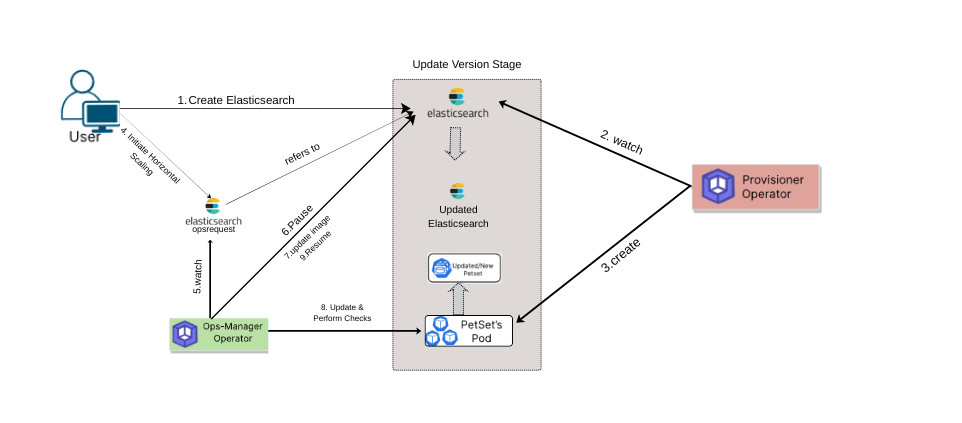
The updating process consists of the following steps:
At first, a user creates a
Elasticsearchcr.KubeDB-Provisioneroperator watches for theElasticsearchcr.When it finds one, it creates a
PetSetand related necessary stuff like secret, service, etc.Then, in order to update the version of the
Elasticsearchdatabase the user creates aElasticsearchOpsRequestcr with the desired version.KubeDB-ops-manageroperator watches forElasticsearchOpsRequest.When it finds one, it Pauses the
Elasticsearchobject so that theKubeDB-Provisioneroperator doesn’t perform any operation on theElasticsearchduring the updating process.By looking at the target version from
ElasticsearchOpsRequestcr, In case of major updateKubeDB-ops-managerdoes some pre-update steps as we need old bin and lib files to update from current to target Elasticsearch version.Then By looking at the target version from
ElasticsearchOpsRequestcr,KubeDB-ops-manageroperator updates the images of thePetSetfor updating versions.After successful upgradation of the
PetSetand itsPodimages, theKubeDB-ops-managerupdates the image of theElasticsearchobject to reflect the updated cluster state.After successful upgradation of
Elasticsearchobject, theKubeDBops manager resumes theElasticsearchobject so that theKubeDB-provisionercan resume its usual operations.
In the next doc, we are going to show a step by step guide on updating of a Elasticsearch database using update operation.